Buying Guides
Outboard Propeller Damage Diagnosis: Bent Blades, Spun Hubs, and Vibration
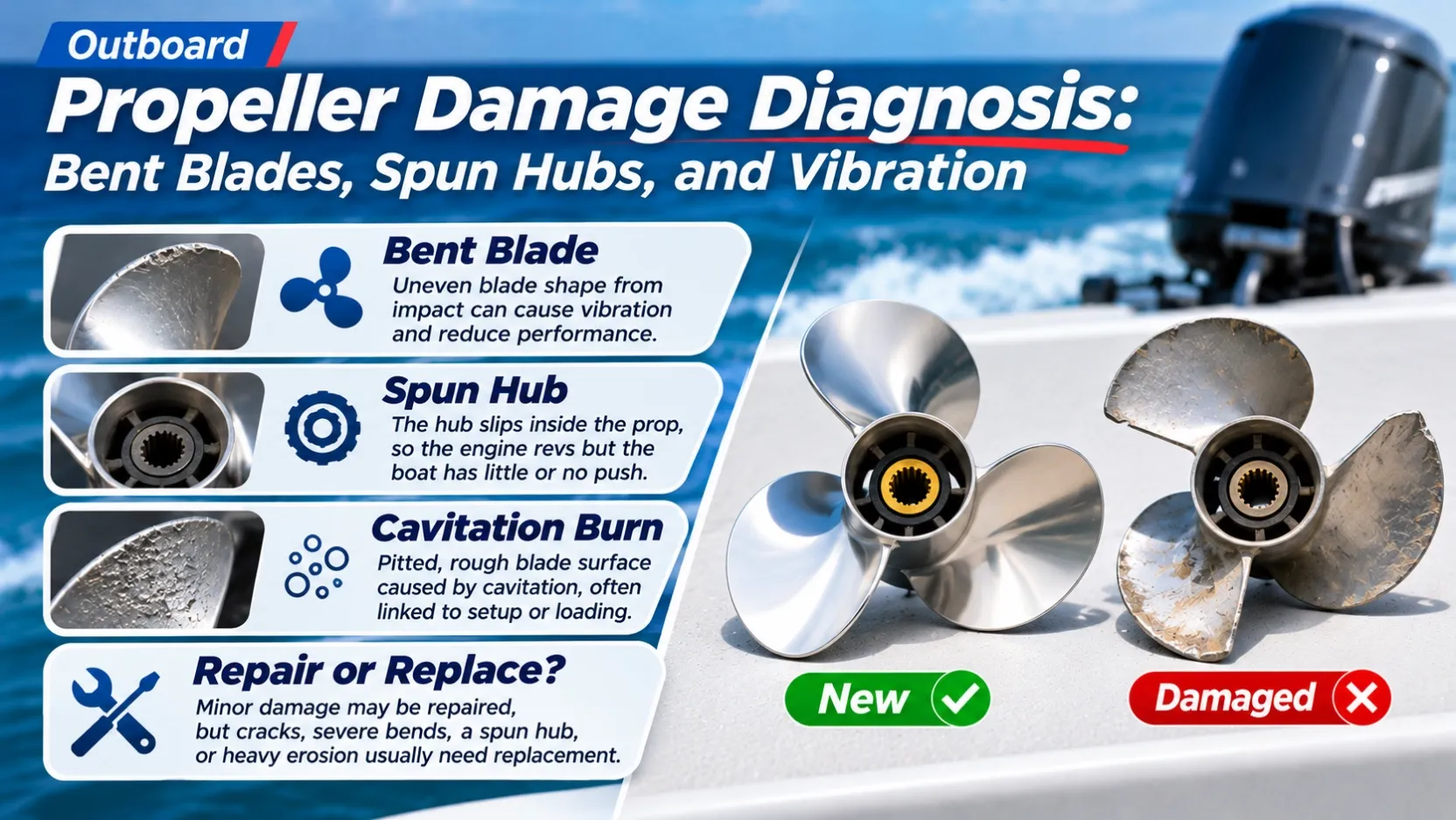
The propeller is the part of the drivetrain most exposed to contact with the underwater environment, so it is also the part most likely to hit sandbars, rocks, floating debris, the trailer, or the dock. Damage is not always obvious from the driver's seat. The usual first signs are vibration that was not there before, engine RPM climbing while boat speed falls, slow planing, or a new noise at cruising speed. This guide works through the five kinds of propeller damage a workshop sees most often, how to confirm each one on the bench, and how to decide between repair and replacement.
Step 1: Take the propeller off and look at it properly
Most propeller damage cannot be judged reliably while the prop is still on the shaft. Remove it (engine off, ignition disabled, gloves on — damaged blade edges are sharp) and check, in order:
- Blade shape. Sight along each blade from behind. All blades should show the same profile. One blade sitting at a visibly different angle is bent, even if the paint is unbroken.
- Leading edges. Run a gloved finger along each leading edge. Nicks, dents and flattened spots are impact damage.
- Blade faces. Look for pitting and a rough, "burned" area on the blade back — that is cavitation erosion, a different problem from impact (see below).
- The hub. Check the rubber hub for cracks, and check whether the hub appears to have shifted inside the barrel.
- Behind the propeller. Remove fishing line wrapped around the prop shaft — a common hidden cause of vibration and seal damage — and check the thrust washer, spacer, nut and cotter pin for wear.
Damage 1: Bent blade
A bent blade is a common result of grounding or striking debris. Even a small bend changes the blade's pitch locally, so the propeller pulls unevenly: the classic symptom is vibration through the boat that rises with RPM, sometimes with a loss of top speed.
- An aluminum propeller with a minor bend can often be straightened and re-pitched by a propeller repair shop.
- A stainless steel propeller is much harder, which protects the blade — but more of the impact force is passed into the gearcase instead. After any hard strike on a stainless propeller, the prop shaft and gearcase should be checked as well.
- Replace rather than repair when a blade is cracked, torn, missing material, or when vibration remains after a repair.
Damage 2: Nicks and dings on the leading edge
Small edge damage looks harmless but disturbs the water flow over the blade and puts the propeller slightly out of balance. The result is a gradual loss of efficiency and a fine vibration that owners often blame on the engine. A propeller shop can dress minor nicks and restore the edge profile; deep gouges, or damage that has removed a noticeable amount of blade area, point to replacement.
Damage 3: Spun hub — high RPM, no push
The hub connects the propeller to the shaft. On propellers with a rubber or modular hub, a hard impact or age can break the bond between hub and barrel: the shaft turns, the propeller barely does. The symptom is a strong indicator once you know what to look for — the engine revs freely, but the boat will not plane or barely moves, as if the propeller had suddenly become far too small.
A common field check is to mark a straight line across the hub and propeller barrel, run the engine under normal operating conditions as appropriate for the application, then inspect the marks. If the two halves have moved relative to each other, the hub may have spun.
- On Mercury / Mariner outboards with a modular hub system, the hub itself is a replaceable wear part: the Mercury Flo-Torq II Hub Kit 835257K1 covers Mercury / Mariner 60–250HP outboards on 1-inch 15-spline shafts (also 40–60HP BigFoot and MerCruiser Alpha One / Bravo One drives, per the product page).
- On propellers with a pressed-in rubber hub, re-hubbing is a propeller-shop job with a press; many workshops replace the propeller instead, especially on smaller engines where a new propeller costs little more than the labour.
Damage 4: Cavitation erosion — the "burned" blade
Cavitation erosion appears as rough, pitted patches on the blade face, usually near the tips. It is caused by vapour bubbles collapsing on the blade surface, not by impact. It can indicate that the propeller or boat setup is operating outside its ideal conditions — for example, incorrect pitch, excessive engine height, or chronic overloading. Replacing the propeller without correcting the cause will produce the same damage on the new one, so treat cavitation burn as a setup diagnosis first and a parts decision second. (Do not confuse it with ventilation — air drawn down from the surface — which causes RPM flare in turns and rough water but does not damage the blade.)
Damage 5: Worn mounting hardware
A propeller is only as secure as its hardware. A worn thrust washer, a damaged spacer, a nut that has been reused too many times, or a missing cotter pin can let a healthy propeller wobble, fret against the shaft, or — in the worst case — come off. Whenever a propeller is replaced after damage, renew the mounting hardware at the same time and tighten the nut to the specification in your engine's service manual. For Yamaha 40 / 48 / 50 / 55HP outboards, the Yamaha Propeller Nut Kit 6H4-W4599-00-00 contains the propeller nut, thrust washers, spacer and cotter pin in one kit.
Repair or replace? A workshop decision table
Condition found | Typical decision |
|---|---|
Minor bend, aluminum, no cracks | Repair (straighten / re-pitch) is reasonable |
Bent stainless blade, or any crack or tear | Replace; also check prop shaft and gearcase |
Small leading-edge nicks | Dress and balance at a prop shop; monitor |
Deep gouges / missing blade material | Replace |
Spun hub, modular hub system | Replace the hub kit |
Spun hub, pressed-in rubber hub | Re-hub at a prop shop, or replace the propeller |
Cavitation erosion | Diagnose the setup first; replace only if blade material is lost |
Worn nut / washer / cotter pin | Renew the hardware kit with the propeller |
Choosing the replacement: match diameter, pitch, rotation and range
A replacement propeller must match the application on several key points: diameter × pitch (stamped on the barrel or hub of the old propeller), rotation (most propellers in our range are right-hand; some large Yamaha sizes are offered in both rotations), blade count, engine HP/model range, and hub/shaft compatibility. Check the propeller's hub and spline/shaft specification against the engine application before ordering. If the propeller needs replacement, use the ranges below as a starting point. Always confirm the exact engine model, shaft/hub specification, rotation and required pitch before ordering.
Our available replacement propellers by brand and HP:
Yamaha
Honda
- Honda 225HP 4-blade stainless steel propeller — sizes are supplied according to application; confirm spline count and rotation (RH/LH) before ordering, as the product page requires.
Suzuki
If the size stamp on the old propeller is unreadable, send us a clear photo of the propeller and hub, plus the part number (if known), engine model/HP, quantity, and destination country on WhatsApp, and we will match the size before quoting.